Flower Garden Silhouette: Graphics & Illustrations Review
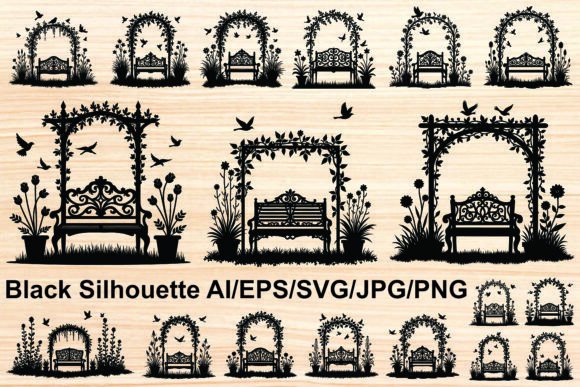
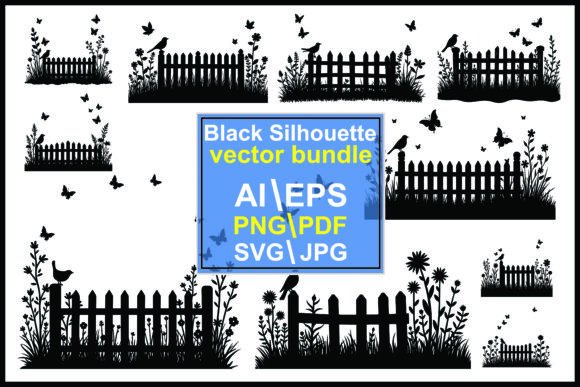
When I first opened the Flower Garden Silhouette file, I immediately pictured a spring craft fair table filled with airy, nature-inspired handmade goods. The black silhouette style is crisp, uncluttered, and carries a quiet charm that feels both rustic and elegant. It’s not a bold, shouty graphic — it’s a gentle garden scene with a picket fence, birds, butterflies, flowers, and soft grass details that whisper rather than scream. As someone who designs for a small handmade business, I look for assets that can fit into multiple product lines without overwhelming the overall look, and this illustration from the Graphics category does exactly that. The mood is whimsical yet polished, making it a natural match for customers who love cottagecore, vintage garden parties, or simply a touch of nature in their everyday items.
I downloaded this Flower Garden Silhouette as part of my prep for a seasonal collection I’m building for my Etsy shop — think custom mugs, tote bags, greeting cards, and sticker packs. The file arrived as a clean vector and a high-resolution PNG, which is exactly what I need for both cutting machines and printable designs. I’ll walk you through exactly how I tested it, what I loved, what I had to watch out for, and how it might work for your own handmade business or DIY projects.
How This Graphics Asset Fits Into Real Handmade Product Workflows
Right out of the folder, I imported the SVG design into Cricut Design Space. The lines were clean, and the whole composition held together without scattered fragments — a huge relief for anyone who’s ever wrestled with poorly traced vectors. The picket fence, birds, and butterflies are grouped logically, so I could easily resize the entire scene or separate elements if needed. For a Cricut project, I cut a test version on premium vinyl and weeded it smoothly. The fence posts are slightly thicker, which gives stability, while the grass blades and butterfly antennae are thinner — more on that later.
For my Silhouette project tests, I did the same in Silhouette Studio. The PNG file came in handy for print-then-cut stickers and for a quick sublimation test on a mug. The black silhouette pops beautifully on a white ceramic background, and when I flipped the design to use it as a heat transfer on a light heather gray tote bag, the graphic held its crispness. Because the Flower Garden Silhouette is a monotone illustration, it’s incredibly versatile: you can leave it black, change the color in your software, or even layer it over a soft watercolor background for a completely different feel. That’s a huge plus when you’re trying to stretch one graphic design asset across multiple printable designs and physical products.
Where Flower Garden Silhouette Shines in Crafting Projects
After testing, I started mentally placing this graphics asset into my product lineup. Here’s where I genuinely think it works best:
- Tote bags and canvas pouches — the scene is large enough to be a focal point without needing extra filler. A simple phrase like “welcome to my garden” or a name beneath it turns it into a personalized gift.
- Mug and tumbler wraps — the horizontal flow of the fence and birds stretches nicely around a curved surface. I’d use it for sublimation or as a vinyl decal on a matte black tumbler for a subtle tone-on-tone effect.
- Greeting cards and gift tags — the silhouette works beautifully on kraft paper or cream cardstock. It’s elegant enough for a wedding invitation suite or a garden-themed thank-you card.
- Sticker sheets and planner stickers — while the full scene is lovely, I also isolated individual butterflies and birds to create accent stickers. The PNG design’s transparent background made this easy.
- Printable wall art — I printed it on textured fine art paper and popped it into a simple black frame. It instantly became a piece that could sell in a handmade business booth or as a digital download.
- Party decorations and favors — I’m already thinking of a garden-themed baby shower, where this silhouette would tie together tags, banners, and favor bags.
What I appreciate most is that the Flower Garden Silhouette doesn’t compete with other elements. It’s a design element that plays well with text — I paired it with a delicate serif font for a romantic look, a clean sans serif for a modern farmhouse vibe, and a flowing script font for a whimsical feel. Each time, the silhouette held its own without making the layout feel crowded.
Points to Watch Before You Cut or Print
No illustration is perfect for every single use, and this one has a few spots where you’ll want to be careful. First, the butterfly antennae and some of the grass blades are quite thin. When I cut the design at less than two inches wide, those fine lines started to tear or didn’t weed cleanly. For sticker design or small vinyl decals, I’d either enlarge the whole scene or simplify the silhouette by removing the tiniest details before cutting. If you’re selling finished products, you absolutely must test on your chosen material first — what looks great on screen might be a nightmare on glitter vinyl or textured cardstock.
Second, because it’s a solid black silhouette, the contrast is high on light backgrounds, but if you place it on a dark product, it can disappear. For sublimation design on a black t-shirt, you’ll need to invert the colors or use a white base. I always run a quick mockup in my design software to see how the Flower Garden Silhouette behaves on different backgrounds. Also, check the PNG resolution: it should be at least 300 DPI at the size you intend to print, especially for printable designs like art prints or card inserts. The file I received was high-resolution, but I still double-check before committing to a batch of products.
Finally, and I can’t stress this enough: commercial licensing. Before you sell anything with this graphic design asset, read the license terms. Ensure you’re allowed to use the Flower Garden Silhouette on physical products you sell, whether on Etsy, at a craft fair, or through a print-on-demand partner. Most design assets come with a standard commercial use clause, but it’s your responsibility to confirm. I always keep a screenshot of the license in my project folder for peace of mind.
Practical Workflow Tips for Crafters and Handmade Sellers
Over the years, I’ve learned that a digital product is only as good as your prep work. Here’s how I’d approach using the Flower Garden Silhouette in a real handmade business production run:
- Test cut or print one sample first. Don’t ruin a whole batch of blanks. Check the SVG for open paths, and make sure the machine settings are dialed in for the material you’re using.
- Mirror and resize thoughtfully. For heat transfer vinyl, always mirror. For sticker sheets, keep a minimum size that preserves the fine lines. I’d avoid anything under 1.5 inches for the full scene.
- Use mockups before listing. Placing the design on a product mockup helps you see if it looks balanced. I tested it on a mug, a tote, and a framed print, and it helped me decide which products to launch first.
- Pair with fonts that complement the mood. A handwritten font or a light serif works beautifully. Avoid heavy, blocky fonts that clash with the delicate silhouette.
- Consider layering. The black silhouette can sit on a soft watercolor wash, a pastel background, or even a subtle wood grain. This one illustration can become multiple products with just a few tweaks.
- Keep the original file safe. Always work on a copy so you can revert if you accidentally delete a key element.
If you’re building a design bundle or a seasonal collection, the Flower Garden Silhouette fits right in with other garden-themed illustrations and nature clipart. I’ve already grouped it with a few floral wreath SVGs and some bee PNGs to create a cohesive spring release. The fact that it’s a vector means I can scale it for everything from a thank-you card to a large wall decal without losing quality, which is invaluable for a small business branding that needs consistency across product types.
Final Thoughts on Using This Illustration for Your Handmade Business
The Flower Garden Silhouette is one of those quiet workhorses in a crafter’s digital library. It doesn’t rely on trendy colors or complicated layers to make an impact — it leans on strong composition and a timeless nature theme. For Cricut users and Silhouette owners, it’s a versatile cut file that can become a charming decal, a heat transfer, or a stencil. For printable product creators, it’s a ready-to-go graphic that elevates cards, tags, and wall art. The black silhouette style is forgiving in terms of color matching, which makes it ideal for batch production and quick turnarounds. I’ve already added it to my spring product lineup, and I’m confident it will appeal to anyone browsing a craft fair table or an Etsy shop looking for a touch of garden whimsy.
Just remember to test those thin lines, respect the commercial license, and don’t be afraid to break the design apart for smaller accents. This graphics asset rewards a little patience, and once you’ve worked it into your workflow, you’ll see exactly why it deserves a spot in your creative marketplace toolkit. Whether you’re a hobby maker experimenting with a new SVG design or a seasoned handmade seller preparing for a busy season, the Flower Garden Silhouette delivers a polished, professional look that feels genuinely handmade — and that’s the sweet spot every handmade business should aim for.